Scalable Web Mapping with Vector Tiles Training Course
Scalable Web Mapping with Vector Tiles Training Course delves into the cutting-edge realm of scalable web mapping using vector tiles.
Skills Covered
Course Overview
Scalable Web Mapping with Vector Tiles Training Course
Introduction
Scalable Web Mapping with Vector Tiles Training Course delves into the cutting-edge realm of scalable web mapping using vector tiles. Participants will gain an in-depth understanding of how vector tiles revolutionize geospatial data visualization by offering unparalleled performance, flexibility, and interactivity on the web. From data preparation and tile generation to client-side rendering and web GIS application development, this program equips professionals with the essential skills to build high-performance mapping solutions capable of handling massive datasets with ease.
The course emphasizes practical, hands-on learning, empowering attendees to master the entire workflow of vector tile implementation. We'll explore open-source tools and industry best practices for creating dynamic, responsive web maps that deliver superior user experiences. Whether you're aiming to optimize existing geospatial infrastructure or develop innovative location-based services, this training will provide the foundational knowledge and practical expertise necessary to leverage the full potential of modern web mapping technologies for diverse applications, from urban planning to real-time data dashboards.
Course Duration
10 days
Course Objectives
Upon completion of this course, participants will be able to:
- Understand the core concepts of vector tiles, their advantages over traditional raster tiles, and their role in modern web GIS architectures.
- Prepare and process large geospatial datasets efficiently for vector tile generation, including data generalization and optimization techniques.
- Utilize open-source tools like Tippecanoe, PostGIS, and GDAL for generating vector tiles from various data sources.
- Implement server-side solutions for serving vector tiles using platforms such as GeoServer, TileServer GL, and cloud-based services.
- Develop interactive web mapping applications using popular JavaScript libraries like Mapbox GL JS, OpenLayers, and Leaflet, leveraging vector tile capabilities.
- Apply dynamic styling to vector tiles using Mapbox Style Specification and other styling languages for custom map visualizations.
- Optimize web map performance and user experience through efficient data loading, rendering, and caching strategies for vector tiles.
- Integrate real-time data streams and geospatial analytics with vector tile-based web maps.
- Implement security best practices for web mapping applications and vector tile services.
- Troubleshoot common issues related to vector tile generation, serving, and client-side rendering.
- Explore advanced vector tile techniques, including 3D mapping, time-series visualization, and data animation.
- Design and deploy scalable web mapping solutions that can handle increasing data volumes and user traffic.
- Evaluate and select appropriate vector tile technologies and platforms for specific project requirements and organizational needs.
Organizational Benefits
- Develop lightning-fast web maps capable of handling vast datasets and high user loads, improving overall system responsiveness.
- Vector tiles are significantly smaller than raster tiles, leading to lower data transfer costs and optimized storage requirements.
- Deliver highly interactive and visually appealing maps with dynamic styling, smooth zooming, and custom feature querying.
- Easily restyle maps on the fly to meet diverse user preferences or analytical needs without regenerating data.
- Adopt cutting-edge web mapping standards that ensure long-term compatibility and adaptability.
- Leverage open-source technologies to reduce licensing fees and development costs associated with proprietary GIS software.
- Equip development and GIS teams with the in-demand skills to build and manage modern, high-performance web mapping applications.
- Streamline the process of map creation and deployment, leading to quicker iteration and delivery of geospatial products.
- Provide stakeholders with real-time, interactive geospatial insights for improved strategic planning and operational efficiency.
Target Audience
- GIS Developers and Engineers
- GIS Analysts and Specialists
- Web Developers
- Data Scientists and Analysts
- Solution Architects
- Urban Planners and Environmental Scientists
- Project Managers.
- Academics and Researchers.
Course Outline
Module 1: Introduction to Web Mapping and Vector Tiles
- Understanding the evolution of web mapping: from static images to dynamic, interactive maps.
- Raster vs. Vector Tiles.
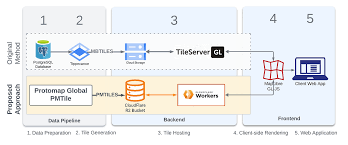
- Key components of a vector tile-based web mapping ecosystem: data sources, tile generation, tile servers, and client-side rendering.
- Introduction to Mapbox Vector Tile (MVT) specification and its widespread adoption.
- Exploring the power of WebGL in modern browser-based mapping.
- Case Study: Analyzing the architecture of a global basemap provider and how they leverage vector tiles for massive scale.
Module 2: Geospatial Data Preparation for Vector Tiles
- Data sources and formats: Shapefiles, GeoJSON, PostGIS, OSM data.
- Data cleaning and validation: Ensuring data quality for optimal tile generation.
- Simplification and generalization: Techniques for reducing data complexity at different zoom levels.
- Handling large datasets: Strategies for efficient processing and storage.
- Introduction to PostGIS for spatial data management and querying.
- Case Study: Preparing OpenStreetMap data for a city-wide vector tile basemap, focusing on data extraction and simplification challenges.
Module 3: Vector Tile Generation with Open-Source Tools
- Tippecanoe: Hands-on for generating MBTiles from GeoJSON.
- PostGIS-based tile generation: Leveraging SQL queries for dynamic tiling.
- Introduction to GDAL/OGR for data conversion and manipulation.
- Batch processing and automation of tile generation workflows.
- Understanding zoom levels, tiling schemes, and tile boundaries.
- Case Study: Generating vector tiles for a national road network, addressing issues of generalization and feature density across zoom levels.
Module 4: Serving Vector Tiles
- Tile server concepts: HTTP servers, caching, and performance.
- TileServer GL: Setting up a lightweight, efficient server for MBTiles.
- GeoServer and MapServer: Leveraging enterprise-grade tile services.
- Introduction to cloud-based tile serving platforms (e.g., AWS S3, Azure Blob Storage).
- Configuring CORS policies and securing tile services.
- Case Study: Deploying a vector tile service for a public transportation network using TileServer GL and optimizing for high concurrency.
Module 5: Client-Side Rendering with Mapbox GL JS
- Introduction to Mapbox GL JS: Architecture, core concepts, and API.
- Loading and displaying vector tile layers.
- Dynamic styling with Mapbox Style Specification: Layers, filters, and expressions.
- Adding interactive elements: Popups, tooltips, and custom controls.
- Working with data-driven styling for thematic maps.
- Case Study: Building an interactive urban planning map showing zoning regulations, allowing users to filter and style features dynamically based on attributes.
Module 6: Advanced Mapbox GL JS Techniques
- Custom layers and sources: Integrating non-standard data types.
- Animation and transitions: Creating smooth visual effects.
- Working with 3D extruded polygons and terrain.
- User interaction and events: Click, hover, drag, and custom interactions.
- Performance optimization: Efficient rendering, culling, and Web Workers.
- Case Study: Developing a real-time traffic visualization map with animated vehicle movements and dynamically updated congestion layers.
Module 7: OpenLayers and Leaflet with Vector Tiles
- OpenLayers: Fundamentals, adding vector tile layers, and styling.
- Leaflet: Integrating vector tiles with plugins (e.g., Leaflet.VectorGrid).
- Comparing and contrasting Mapbox GL JS, OpenLayers, and Leaflet for vector tile usage.
- Building basic web mapping applications with these libraries.
- Handling different projection systems with vector tiles.
- Case Study: Creating a disaster response map where emergency zones are loaded as vector tiles and overlaid on a Leaflet basemap for rapid deployment.
Module 8: Styling Vector Tiles Effectively
- Mapbox Style Specification (JSON): In-depth exploration of its structure and capabilities.
- CartoCSS (for older stack): Understanding its role in tile styling.
- Sprite and Glyph management: Optimizing for icons and fonts.
- Responsive styling: Adapting maps for different screen sizes and resolutions.
- Best practices for cartographic design with vector tiles.
- Case Study: Designing a branded corporate basemap with custom colors, fonts, and icons, ensuring consistency across various applications.
Module 9: Performance Optimization and Caching
- Client-side caching strategies: Browser cache, service workers.
- Server-side caching: Reverse proxies and content delivery networks (CDNs).
- Tile expiration and update mechanisms.
- Techniques for minimizing network requests and payload size.
- Monitoring and debugging web map performance.
- Case Study: Optimizing a high-traffic e-commerce store locator map for faster load times and smoother interactions by implementing robust caching strategies.
Module 10: Geospatial Analytics and Vector Tiles
- Integrating client-side geospatial libraries (e.g., Turf.js) with vector tiles.
- Performing spatial queries and analysis directly in the browser.
- Visualizing geospatial statistics (e.g., heatmaps, clusters) from vector data.
- Connecting to backend geospatial services for complex analytics.
- Real-time data processing and visualization on maps.
- Case Study: Analyzing population density and demographics using vector tiles to identify underserved areas for public services, visualizing results as thematic layers.
Module 11: 3D Web Mapping with Vector Tiles
- Introduction to 3D mapping libraries (e.g., Three.js, CesiumJS).
- Extruding vector tile data for 3D building models.
- Integrating terrain data with vector tile layers.
- Navigating and interacting with 3D scenes.
- Applications of 3D web mapping in urban planning and simulation.
- Case Study: Developing a virtual city tour application, rendering 3D buildings from vector tiles for a realistic urban environment.
Module 12: Advanced Data Management and Automation
- Database integration: PostGIS for large-scale data storage and management.
- Automated tile regeneration: Setting up continuous integration for map updates.
- Version control for geospatial data and styles.
- Scripting for data pipelines: Python with GDAL/OGR and other libraries.
- Monitoring data quality and consistency.
- Case Study: Automating the update process for a national land-use map, ensuring that changes in the source data are reflected in the vector tiles regularly.
Module 13: Security and Deployment Considerations
- Securing vector tile services: API keys, authentication, and authorization.
- Protecting sensitive geospatial data.
- Deployment architectures: On-premises vs. cloud-based solutions.
- Containerization with Docker for deployment consistency.
- Scalability strategies for production environments.
- Case Study: Deploying a secure internal mapping portal for an energy company, ensuring only authorized personnel can access sensitive infrastructure data via vector tiles.
Module 14: Integrating with Other Web Technologies
- Front-end frameworks: React, Vue, Angular integration with mapping libraries.
- Backend integration: Node.js, Python Flask/Django for data APIs.
- Websockets for real-time data push.
- Embedding maps in various web applications and dashboards.